Website Indexing
I noticed a discussion on Reddit regarding this topic.
The indexing criteria for search engines like Bing do not simply depend on the sheer volume of published articles or the presence of a certain amount of web traffic; rather, priority is given to websites that possess external backlinks.
In other words, this refers to instances where other high-quality websites feature a link pointing to your URL.
However, some users also pointed out that a website address placed in the description section beneath a YouTube video does not count as an external backlink—even if that link generates a significant amount of referral traffic.
Of course, this remains largely a matter of speculation and observational data; it may not necessarily be the absolute truth.
Suffice it to say that relying solely on adding a link to your blog within the description of your YouTube videos is unlikely to result in rapid indexing by search engines like Bing—even considering that Google (the search engine) and YouTube are business entities under the same parent company.
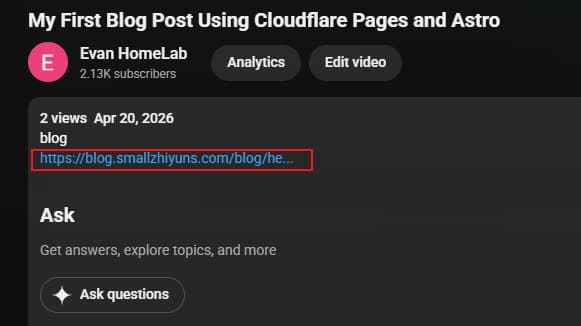
For instance, as shown in the image below, I included a link to my corresponding blog within the description of one of my YouTube videos, but it proved to be ineffective.
I conducted tests on this myself, and the results confirmed that such a link does not function as a valid or useful backlink.
IndexNow Code
As I’ve mentioned before, a blog serves a dual purpose: it can function as a script or transcript for a video presentation, while also acting as an extension that supplements the video content.
Take, for instance, the IndexNow code snippet I am sharing and documenting in this post. Written in Node.js, this script allows you to programmatically submit URLs to Bing’s IndexNow service—you simply need to update the parameters with your own specific details.
The code is fully copyable directly from this blog post (something that isn’t possible with the accompanying YouTube video).
Code Snippet
const url = 'https://api.indexnow.org/indexnow';

const data = {
    host: "domain.com",
    key: "keyStr",
    keyLocation: "https://domain.com/keyStr.txt",
    urlList: [
        "https://domain.com/xxx/",
    ]
};

async function submitIndexNow() {
    const res = await fetch(url, {
        method: 'POST',
        headers: {
            'Content-Type': 'application/json'
        },
        body: JSON.stringify(data)
    });

    console.log('status:', res.status);
    console.log('result:', await res.text());
}

submitIndexNow();
A Quick Note:
While working on static web pages, I noticed that the IndexNow API appears to accept requests initiated only from the server side.
If the request is initiated from the front-end browser, cross-origin permission issues may arise, potentially causing the request to fail.